Overview
There are 2 ways to view an order in the Control Panel. "Invoice" mode allows you to print out an invoice similar to what the customer sees when they complete their order. Edit mode allows you to work with the order, to add shipments, order status, etc...
Viewing an Order in Invoice Mode
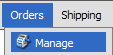
- Click the Orders > Manage menu link
- You will see a table showing your orders. Click anywhere on the row that contains the record you wish to open. The row will highlight yellow when your mouse is over it.
Viewing an Order in Edit Mode
- Click the Orders > Manage menu link
- You will see a table showing your orders. Click the
 link to the left of the order you wish to edit.
© 2001-2010 Lighthouse Development. All Rights Reserved.